Lay it on the table
The top button and the text meant for the person opposite are drawn upside down, so they read it the right way up without anyone picking the phone up.
No account, ever
No email, no password, no “continue with Google”. Open the app and talk. Your past conversations stay on your phone, and nowhere else.
It keeps your tone
Polite stays polite, blunt stays blunt, jokes stay jokes. It picks the right formality from how you've been speaking to each other.
Bring more people in
Show a QR code or send a link, and up to four others join on their own phones, each in their own language. They don't need the app: it opens in their browser, on any phone.
Try it before you pay for it.
Your first 50 translations are free and need no account — enough for a real conversation, not just a demo. After that you buy time, not translations: a week or a month of talking as much as you need. Neither one renews. And for the places with no signal, offline mode is yours for good with one payment.
Free
€0
Enough for a real conversation, not just a demo
- 50 translations
- All 40+ languages
- Natural AI voice, same as paid
- No account, no card
Get the iPhone app
For a trip or a visit
Week pass
€2.99
A trip, a visit, an appointment
- 7 days of translation
- Talk as much as you need
- Every voice, every language
- Offline mode included for the week
- Ends by itself — nothing renews
Get the iPhone app
Month pass
€6.99
For family you talk to every week
- 30 days of translation
- Talk as much as you need
- Every voice, every language
- Offline mode included for the month
- Ends by itself — nothing renews
Get the iPhone app
Offline forever
€9.99
For the places with no signal
- Offline mode, with no end date
- On every iPhone with your Apple ID
- Pay once — nothing renews
- The online AI still needs a pass
Get the iPhone app
Passes and Offline forever are bought in the Mama Translate app for iPhone, in your own currency. Offline mode needs iOS 26 or later, and is less accurate than the online AI. Fair use: up to 3,000 translations in any 30 days — about 100 a day. Buying while a pass runs adds to its end.
Questions
Do I need to create an account?
No. Open it and talk — your free translations need nothing at all. A pass is bought through the App Store like any other purchase, and belongs to the phone you bought it on.
Does it work without internet?
On an iPhone, yes. With no signal, the app switches to offline mode by itself: your iPhone's own speech recognition and Apple Translate do the work, and nothing leaves the phone. It's less accurate than the online AI, needs iOS 26 or later and a one-time download of your languages, and comes with any pass — or for good with Offline forever, paid once.
Is a pass a subscription?
No. A week pass is seven days from when you buy it, a month is thirty. Then it simply stops, and you're back to any free translations you had left. Nothing renews, and there is nothing to cancel.
Is my conversation stored?
Only on your phone. The app keeps your past conversations — what was said and its translation, never the audio — so you can find an address or the name of a medicine later. They are never sent to us, never backed up to iCloud or Google, and you can delete them at any time. On the website, a conversation is gone when you close the page. Your audio is sent to OpenAI in the US to be translated, which they may hold for up to 30 days to detect abuse and do not train on — the full details are here, including where this app is not appropriate.
Do the people I talk to need the app?
No. The person across the table uses the other half of your screen. Someone on their own phone opens your link or QR code in their browser — on an iPhone or an Android — and picks their language. You pay; they don't.
Which languages?
43: Italian, English (US and UK), Spanish (Spain and Mexico), French, German, Portuguese (Brazil and Portugal), Dutch, Polish, Romanian, Russian, Ukrainian, Greek, Czech, Slovak, Hungarian, Croatian, Serbian, Bulgarian, Swedish, Norwegian, Danish, Finnish, Turkish, Arabic, Hebrew, Persian, Hindi, Bengali, Urdu, Mandarin (Simplified and Traditional), Japanese, Korean, Vietnamese, Thai, Indonesian, Malay, Filipino, Swahili and Catalan. Not yet: Cantonese, Kurdish, Nepali, Georgian, Dari or Pashto.
Why not just use the free one that's already on my phone?
Try both on a real back-and-forth conversation. The difference shows up in pronouns, formality and short answers — the places where forgetting the previous sentence quietly changes the meaning.
What if it mishears something?
It shows you what it heard as well as what it said, so you can spot a mistake and say it again. There's a replay button too.
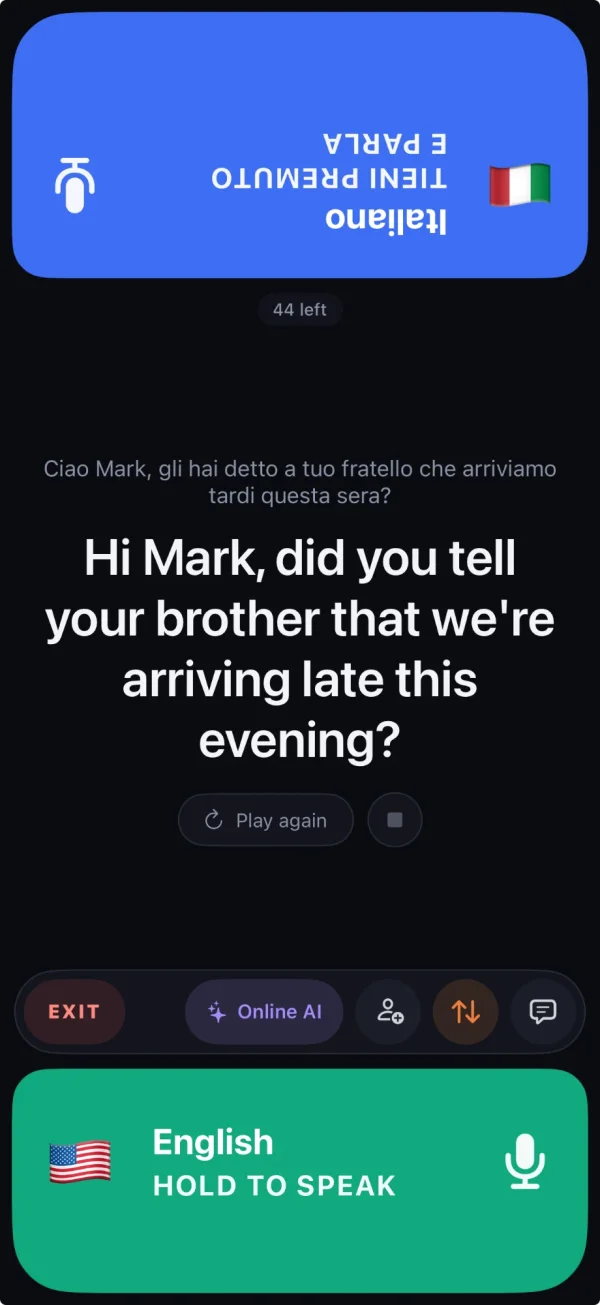









































 Italianotieni premuto e parla
 Englishhold to speak